# Features
## Audio and Screen Cast Input
You can record both audio and your screen using the Shelley web client. (Alas, this doesn't work on mobile browsers). Shelley will transcribe the text and line it up with the video, and act on it.
## Mobile and desktop apps
[exe.dev](https://exe.dev) offers iOS and Android apps
to manage your VMs and the Shelley instances on them.
[Shelley Launcher](https://exe.dev/mac/shelley-launcher) for macOS
## Automatic Compaction
*Originally published at [blog.exe.dev/compaction](https://blog.exe.dev/compaction) by Philip Zeyliger and Maisem Ali on October 27, 2026.*
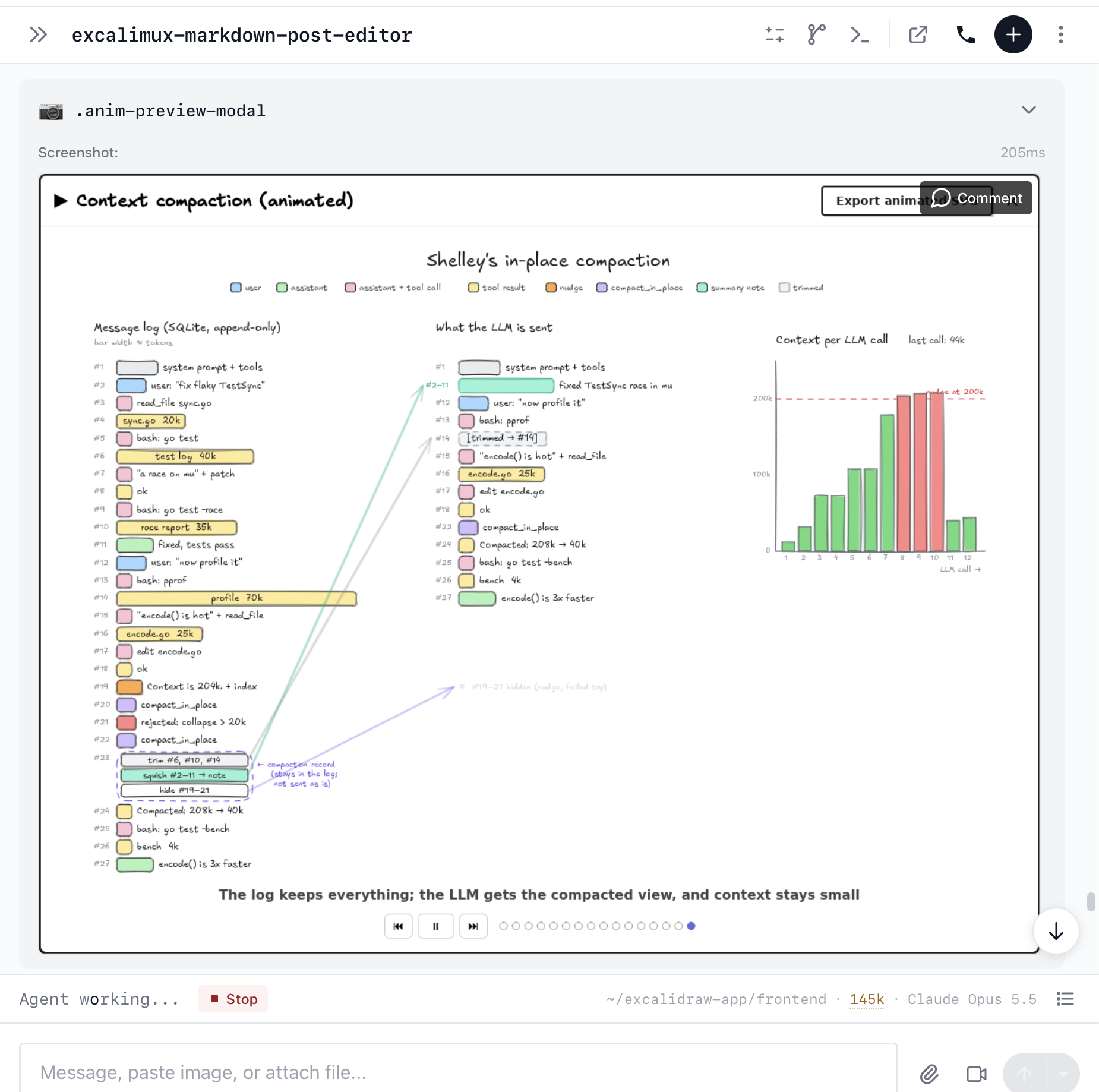
At about 200k tokens, the harness nudges the model to use a compaction-in-place tool to trim tool outputs and squish messages together.
When it comes to LLMs, context rules everything around us. An agent loop is inherently quadratic: messages accumulate and every iteration you send the full stack of messages to the model. That stack of messages is *the context*, and it starts with a system prompt, descriptions of the tools, and your instructions. Messages upon messages get added. Tool responses (in other words, the agent reading your source code) usually end up being the majority of the context. This impacts cost (see [Expensively Quadratic: the LLM Agent Cost Curve](https://blog.exe.dev/expensively-quadratic)) and quality. You want to give the model just the "right amount" of context, but how?
*Compaction* is the process of taking your current (long) conversation and rewriting or removing stuff to make it a shorter conversation.
Shelley's approach to compaction is to insert a "nudge" message from the harness at about 200k tokens and to give the model a compaction tool that lets it (a) truncate specific tool outputs and (b) "squish" together sections of history into smaller, rewritten segments (which will then have pointers to the originals). 200k seems like the sweet spot for current frontier models, but we've left the exact number configurable.
The compaction tool requires a few rounds. First, the model gets an "index" so that it can identify the messages by a sequential id. Then, the model suggests messages to collapse or trim. Shelley has a "linter" that verifies that the compaction isn't too big or too little. The model tries again, and usually the second time is just right. After compaction, the conversation continues as it always did, except the squished chunks are shorter, the verbose tool outputs are trimmed, and evidence of the compaction is no longer visible to the LLM.
From a data model perspective, a Shelley conversation has some mutable state (slug name, model choice, current draft) and an append-only log of messages. Compaction is materialized as special "compaction" messages, and the harness, when concatenating all the messages together to send to the LLM, replaces the relevant chunks with their rewrites and trimmed results. If the model ever wants to read something that got compacted away, the data is in SQLite, and Shelley has a skill to hint at the right query. (One of Shelley's principles is the ability to be introspective. I tuned the linter heuristics by having Shelley introspect and backtest its own past conversations.)
This is Shelley's third(!) implementation of compaction. The previous two implementations started a new "generation" of a conversation inside the same conversation, with a brand-new context and a summary (first implementation), and preserving the most recent messages (second implementation). This third implementation keeps it going as one conversation, but the history is somewhat rewritten. I'd love to believe this is our last implementation, but model capabilities have been changing quickly, and I expect there will be more iteration.
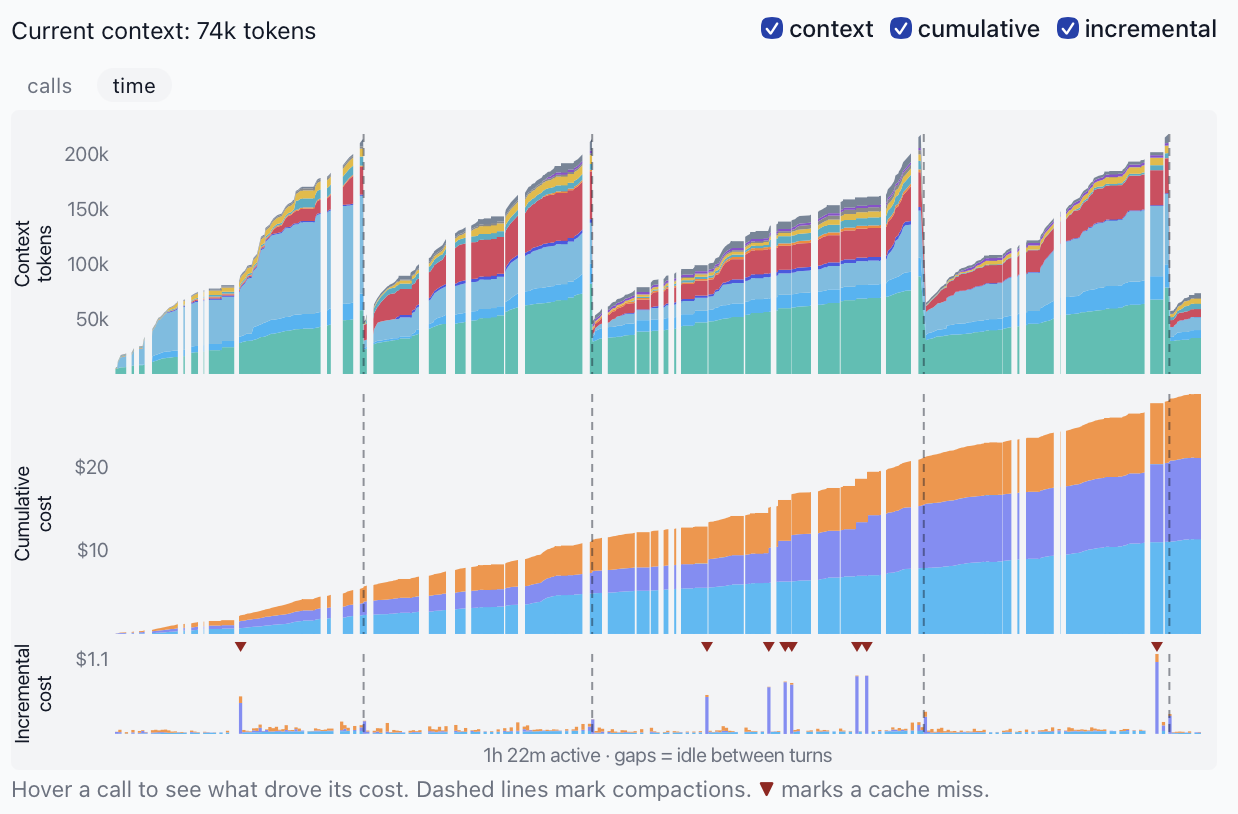
From the cost perspective, this is the cost graph for a recent long Opus 5.5 conversation. It adds up to about $25 and has gone through 4 compactions, with the context length capping out at about 200k. The little arrows where the price spiked are $1 cache misses, probably when I stepped away from the computer. (You can get this graph in your Shelley session by clicking on the context length counter.)
Context length and cumulative cost for a long Opus 5.5 conversation, across 4 compactions.
We've been rocking this implementation for a few weeks, and we think it works quite well. We've enabled "auto compaction" by default. I used to click on "Compact and Send" every once in a while and look at the context length. Now, I just talk, and talk, and talk, and it's all good. I've also started letting my agentic conversations meander a bit more, do follow-ups and so on.
Tune in next week to hear about switching to asynchronous tool and subagent calls. Or maybe we'll talk more about multiple input modalities!
If you're interested in more of our writing about coding agents:
- [The Unreasonable Effectiveness of an LLM Agent Loop with Tool Use](https://sketch.dev/blog/agent-loop)
- [Expensively Quadratic: the LLM Agent Cost Curve](https://blog.exe.dev/expensively-quadratic)
- [The Topology of an LLM Agent Loop With Tool Use](https://blog.exe.dev/topology)
P.S.: Here's a behind-the-scenes look at yak-shaving involved in building the animation above. I built it using Shelley, after having earlier built a bespoke program using [Excalidraw](https://github.com/excalidraw), and after adding animations to said bespoke drawing program.
Building out the animations for this post in Shelley
## Customization
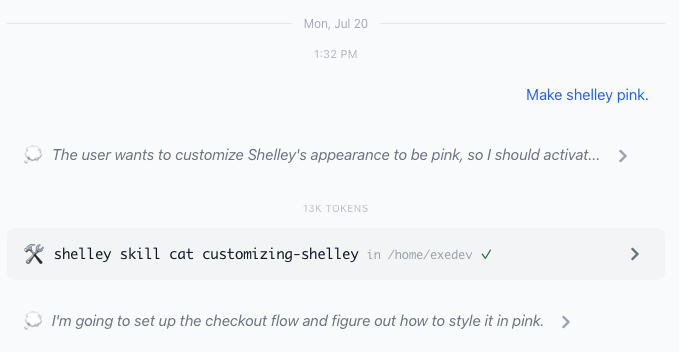
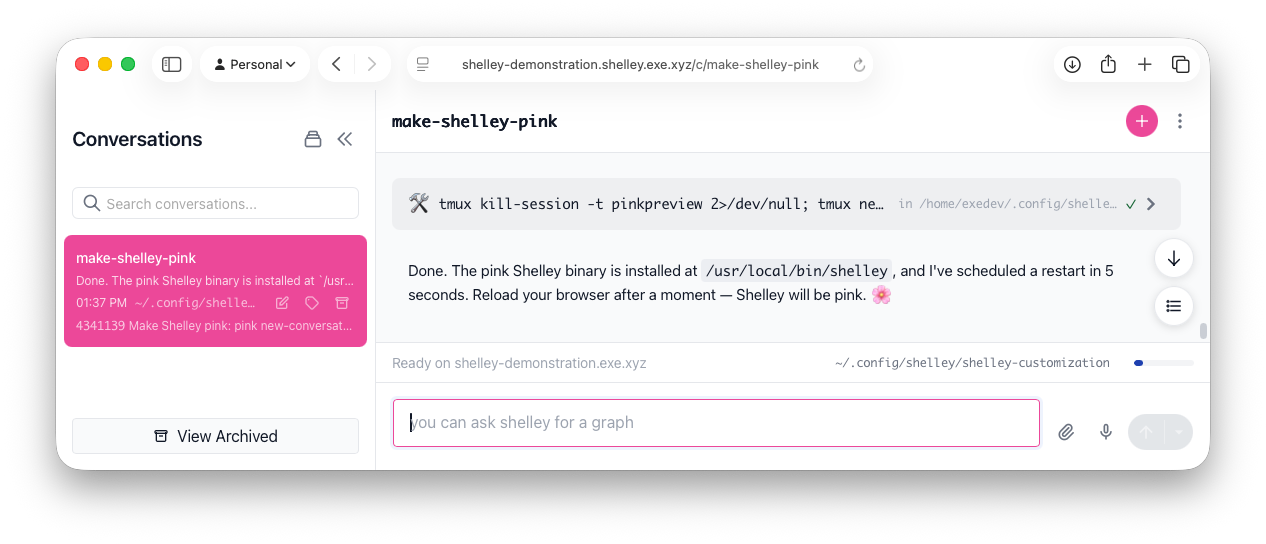
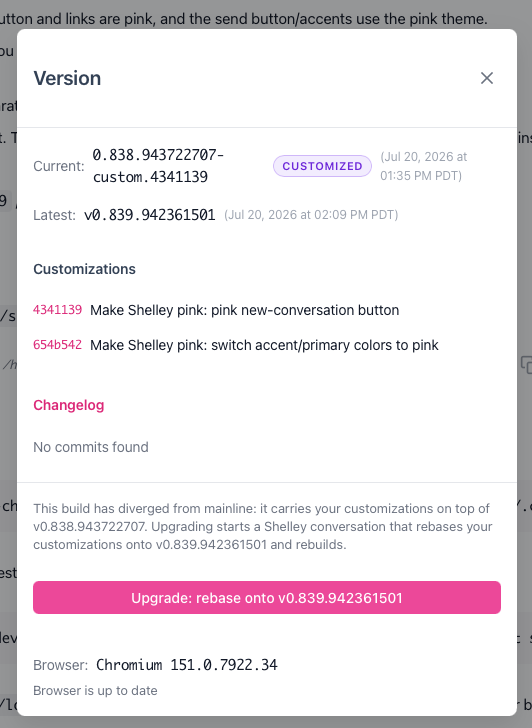
If you want to customize Shelley, open up a conversation, and ask the agent to change itself. It will do so. When a new version of Shelley ships, it rebases your customizations onto the latest version, so your changes always carry forward.
The traditional approach to software customization has been configuration and plug-in architectures. With the advent of coding agents, a third way is viable: edit the code. The tool exists to serve you, so [treat it like a wiki](https://blog.exe.dev/software-as-wiki), slap an "Edit With Shelley" ribbon on it, and go to town.
Give customizing Shelley a shot! When you've got features that can stand the test of time, [pop into our Discord](https://exe.dev/docs/getting-help), and let us know.
You can also customize Shelley with hooks and skills.
Asking Shelley to make itself pink.Sure is pink.Pink upgrade screen automates rebase.
See our blog post on [Customizing Shelley, Customizing Software](https://blog.exe.dev/customizing-shelley)
## Hooks
Shelley will execute scripts in a hooks directory at various
points in the life cycle.
| Hook | When it runs |
|---|---|
| `system-prompt` | When a system prompt is built |
| `new-conversation` | When a conversation is created. |
| `chat-message` | On every message in the conversation. |
| `end-of-turn` | When the agent becomes idle. |
| `slash/` | When a user message starts with `/` and a matching executable exists |
| `status-bar` | Often; think of this like a `$PS1` prompt. |
The best way to write these hooks is to ask Shelley to do so.
## Diffs and Comments and Diff Highlights
Shelley notices new git commits, and offers a view
to see the git graph, as well as diffs. You can leave
comments for the agent right in the UI. Switch
from Comment 💬 mode to Edit ✏️ mode to edit the
file right there and then.
See also our blog post on [Right-Hand Editable Diffs](https://sketch.dev/blog/right-hand-editable-diffs).
## Embedded Terminal
Sometimes, you just need to `!bash`. The embedded
terminal keeps your session across reloads by leveraging
[exe-scroll](https://blog.exe.dev/exe-scroll).
## `output_iframe`
The agent is given a tool to output not just images, but
arbitrary HTML (secured in an iframe). This allows the
agent to drag one-off diagrams and so on. Shelley ships
with skills for using [Vega-Lite](https://vega.github.io/vega-lite/)
and [Excalidraw](https://github.com/excalidraw).
For more complicated needs, ask the agent to run a web server.
## Images and Audio
Paste in images or record audio: Shelley uses vision
models. I often take a screenshot from Discord or GitHub or
Slack, and paste it in without any further instruction.
## Self Inspection (and sqlite)
Models are great at SQL. We use SQLite as Shelley's datastore,
allowing Shelley conversations to introspect. Some example prompts:
* Given the conversations so far, what would you suggest we add to AGENTS.md?
* How much money have I spent on Shelley conversations this week?
* What is my most popular model?
* How did we log into that CI machine last time we did it?
## Subagents, Asynchronous Tools
Shelley has a subagent tool. You can ask to use a subagent explicitly, or sometimes the model will split up work into subagents by itself. You can inspect subagents to see what they're up to.
When a bash tool call takes too long, Shelley lets the tool call
keep running, but returns control to the agent loop.
A conversation is "idle" when there are no running subagents or tools.
## Multiple Simultaneous Conversations
You can do more than one thing at a time from the same Shelley!
## Relatively Lightweight
Shelley is a single-file binary and has modest resource usage.
No need to worry about NodeJS or RAM usage by the agent itself.
## State of the Art Browser Tools
Shelley uses the excellent [ChromeDP](https://github.com/chromedp/chromedp) package for Go
to control a Chromium or Chrome browser using the Chrome
Developer Protocol. As such, it can browse web pages,
take screenshots, execute JavaScript, read logs,
take profiles, resize to mobile sizes, and so on. Anything you can do with
the Chrome dev console, Shelley is able to do.
On [exe.dev](https://exe.dev/) VMs, Shelley uses [`/headless-shell`](https://github.com/chromedp/docker-headless-shell) for its browser.
Elsewhere, it will find a Chromium in your PATH.
Most of the demos on this page were one-shot by asking Shelley
to record a feature.
## Profiles
Profiles are presets to save a collection of agent settings, most
notably model, thinking level, and tool set.